

Audio Download by Link: Simple Step-by-Step Guide
Audio download by link explained: paste a link, get an MP3. See which links work, how to save direct audio files, and how to convert Instagram links.
InstaMP3Box Team10 min read
On this page▼
- Key takeaways
- What does audio download by link mean?
- The three kinds of link
- 1. Direct file links
- 2. Web page links
- 3. Social and video platform links
- How to download audio from a direct link
- How to download audio from a web page
- How to download audio from an Instagram link
- What happens when you paste a link into a converter
- Choose the right quality
- Download audio by link on iPhone and Android
- How to avoid unsafe link-to-audio sites
- Rights, licences and what you can download
- When a link will not download
- The short version
An audio download by link means you start with a web address and end with an audio file on your device. What happens in between depends on the kind of link. A direct link to an .mp3 file can be saved straight from your browser. A link to a web page usually needs a download button or a feed. A link to a social post, such as an Instagram Reel, needs a converter that pulls the sound out of the video and encodes it as an MP3.
This guide explains the three kinds of link, how to download audio from each, how to do it on a phone and on a computer, how to avoid unsafe “paste any link” sites, and what to do when a link will not download. For Instagram links specifically, the InstaMP3Box converter turns a public post into an MP3 in a few seconds.
Key takeaways
- Look at the link first. A web address that ends in .mp3, .m4a or .wav is a file; most other links are pages.
- Direct files need no converter. Open the link and use your browser’s save option.
- Social links need extraction. The sound is bundled inside a video, so it has to be separated and encoded.
- No tool works on every site. Be wary of any page that promises to download audio from any link on the internet.
- Download only what you have the right to use. A working link does not mean you have permission.
What does audio download by link mean?
People use the phrase for a range of tasks: saving a podcast episode, grabbing a voice message someone shared, keeping the sound from a video you posted, or downloading an audio file from a website. In every case you hold a URL, and you want the sound at the other end of it as a file you can keep, play offline, edit or transcribe.
The reason there is no one-size-fits-all button is that a link can point to three very different things, and each needs a different method. Working out which one you have takes about ten seconds and saves a lot of frustration.
The three kinds of link
1. Direct file links
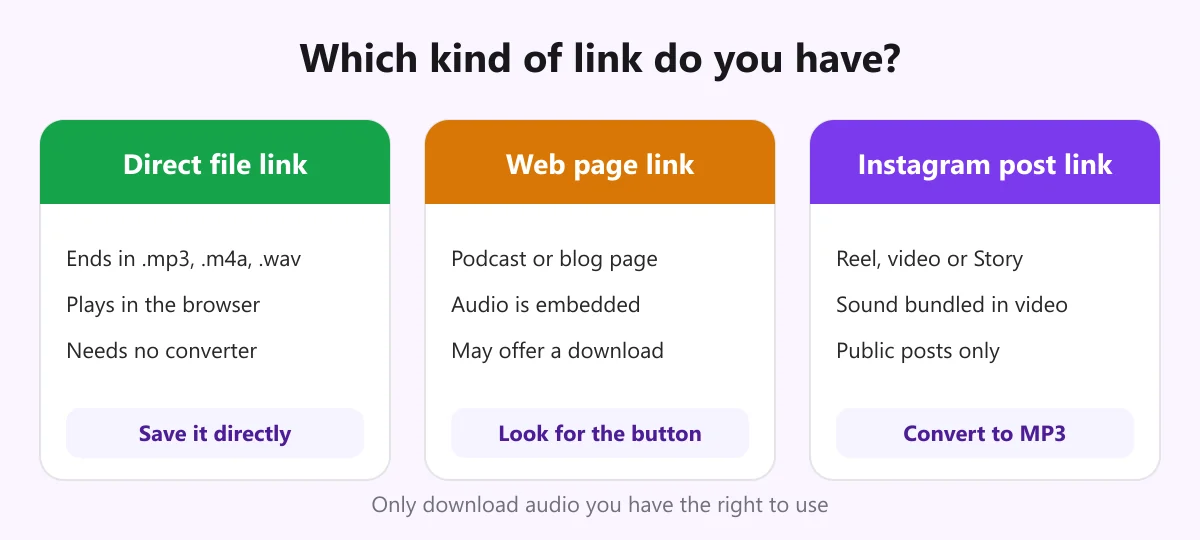
A direct link points to the audio file itself and usually ends in an extension such as .mp3, .m4a, .ogg or .wav. If you paste one into a browser, it either starts playing in a simple player or begins downloading. These are the easiest links to deal with, and you do not need any converter. For background on how audio and video files are packaged, see the overview of media container formats.
2. Web page links
Most links you copy point to a page that contains audio, not to the audio itself: a podcast episode page, a blog post with an embedded player, a course lesson. The file exists somewhere behind the page, but you often have to find it through a download button, a menu, or the podcast’s RSS feed.
3. Social and video platform links
A link to an Instagram Reel or similar post points to a page whose video has the sound mixed in. There is no audio file to save. Getting the sound means reading the public post, separating the audio, and encoding it as a normal audio format. That job is what a converter does.
How to download audio from a direct link
If the link ends in an audio extension, you have three simple options.
- Open it in your browser and use the player’s download or menu button, or press the standard save shortcut. On many players you can right-click and choose the option to save the audio as a file.
- On a phone, long-press the link and choose to download or save the linked file. On iPhone, the file is saved to the Files app; on Android, it goes to your Downloads folder.
- Use a command-line tool if you are comfortable with one. With curl, the command
curl -L -O "https://example.com/file.mp3"downloads the file and keeps its name.
A quick sanity check afterwards: at 128 kbps an MP3 is about 1 MB per minute, so a ten-minute file around 10 MB is normal. A file that is a few kilobytes is usually an error page rather than audio.
How to download audio from a web page
When the link is a page, try these in order:
- Look for an obvious button labelled download, share or the three-dot menu on the player.
- Check the page for a direct link to the audio, which many podcast hosts include below the player.
- Use the podcast’s own app or feed. Podcast apps download episodes for offline listening and are the intended route.
- Ask the publisher. If a creator offers no download, there may be a reason, such as licensing.
Be sceptical of sites that claim to rip audio from any page. If a publisher has chosen to stream only, downloading around that is often against their terms.
How to download audio from an Instagram link
Instagram posts are the case where a link-based converter is genuinely useful. The steps are the same on every device.
- Copy the link. In the Instagram app, tap the three dots on the Reel, video or Story and choose Copy link. On a computer, copy the address from the browser bar.
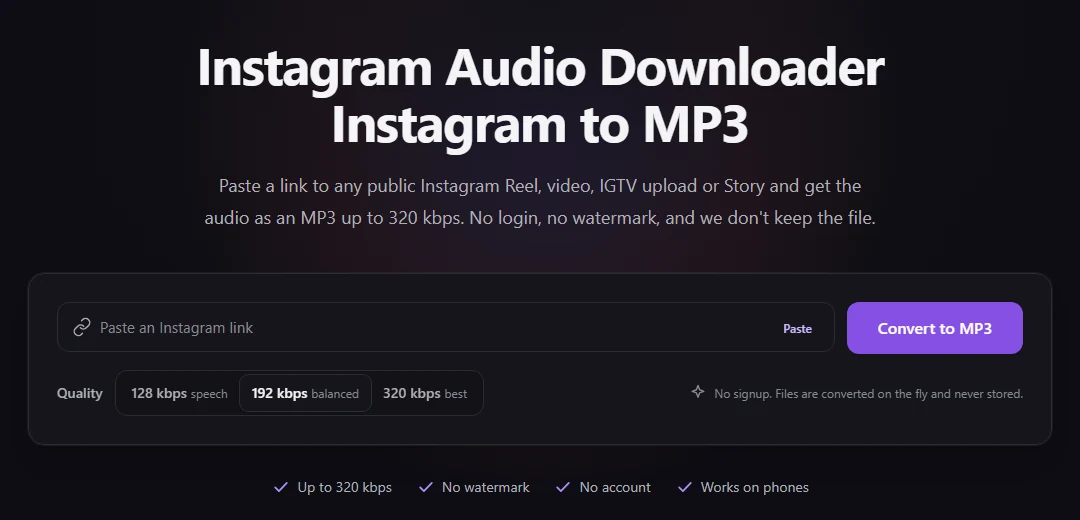
- Paste it. Open the Instagram audio downloader, paste the link and pick 128, 192 or 320 kbps.
- Download. Check the title, creator handle and duration, then press download. The MP3 is encoded as it streams to you and is not stored on our server.
This works for public posts only. Our dedicated pages cover each type: the Reels to MP3 converter, the Instagram video to MP3 converter and the Story audio downloader. For a fuller explanation of the process, read our complete guide to the Instagram audio downloader, and if you want a file with no overlays, see our article on an Instagram audio downloader without watermark. For the exact steps on your device, see the guide to downloading Instagram Reel audio, and if you want a transcript rather than an MP3, read how SpeakApp’s Instagram audio download compares.
What happens when you paste a link into a converter
Behind the single button there are a few steps. Knowing them helps you judge any tool.
- The link is validated. The tool checks that the address is the kind it supports and removes tracking parameters. InstaMP3Box does this in your browser first, so a typo is caught before anything is sent.
- The public post is read. The server looks up the post and finds its audio. This fails for private accounts and deleted posts.
- The audio is encoded. We use the LAME encoder at 44.1 kHz and the bitrate you chose, and embedded metadata is stripped from the output.
- The file is delivered. It is sent while it is still being encoded, which is why the download starts quickly.
A good converter also tells you when it cannot help, for example when a post has no sound, instead of returning an empty file.
Choose the right quality
When a tool offers a choice of bitrate, use this rule of thumb:
- 128 kbps (about 1 MB per minute) for speech, podcasts and voice notes.
- 192 kbps (about 1.4 MB per minute) for most music and mixed audio.
- 320 kbps (about 2.4 MB per minute) if you plan to edit the file further.
A higher bitrate cannot add detail that the source did not have. If the original was compressed, the best you can do is preserve it. To see how big a file will be, use the MP3 file size calculator.
Download audio by link on iPhone and Android
Because converters run in the browser, you do not need an app.
- iPhone and iPad: use Safari, paste the link and download. Open the Files app and look in Downloads. From there you can share the file to an editor or a voice-memo app.
- Android: use Chrome, paste the link and download. The file appears in your Downloads folder and in your music player.
- Computers: files go to your normal downloads folder and play in any media player.
If a file arrives as M4A instead of MP3, a backup service handled that link. M4A plays on almost every device and any audio editor can convert it to MP3.
How to avoid unsafe link-to-audio sites
The results for this keyword are full of sites that promise to download audio from any link. A handful of checks keeps you safe.
- Never share your passwords. A downloader for public links does not need your login for Instagram or anything else.
- Do not install anything. Pages that insist on a player, an extension or a “downloader app” are suspect.
- Check the file you receive. It should be an .mp3 or .m4a of a sensible size, not an .exe, .apk or .zip.
- Watch for fake buttons and pop-ups. Several identical download buttons, redirects and surveys are a pattern.
- Read the privacy policy. It should say what is logged and whether files are kept; ours is the privacy policy.
Rights, licences and what you can download
The fact that a link works does not mean you can reuse what is behind it. Audio you made yourself is yours. Content you have written permission for, or that is public domain or openly licensed, is fine when you follow its terms. Copyrighted music and spoken content you do not have rights to is not, and many streaming and social platforms restrict downloading outside the features they provide. For sources you can use freely, read our guide to a safe and legal audio download as a free MP3. Our terms of service explain how the converter may be used, and rights holders can reach us through the contact page. This is general information, not legal advice.
When a link will not download
- The link has expired. Many direct media links are temporary, signed addresses that stop working after a while. Go back to the page and get a fresh one.
- You see an error page (403 or 404). The file was moved, deleted or restricted. Check the address for typos.
- You are asked to log in. The content is private or members-only, and a downloader cannot reach it.
- The link opens a page, not a file. Use the page methods above, or a converter if it is a supported platform.
- The converter says the post is unavailable. The Instagram account may be private, the post deleted, or the Story expired. A good test is to open the link in a private browsing window.
- The file will not play. It may be a renamed video or an unsupported codec. Try another player, or convert the file to MP3.
The short version
For an audio download by link, first identify the link. Save a direct file from the browser, find the download option on a page, and use a converter for supported social posts such as Instagram. Avoid sites that promise everything, never give out passwords, and keep to audio you have the right to use. When you have a public Instagram link, paste it into the converter and your MP3 is ready in seconds.
InstaMP3Box Team
The InstaMP3Box team writes guides on saving audio from Instagram — from quick how-tos to deeper explainers on bitrate and file formats.
How we write and update our guidesFollow on X (Twitter) ↗Frequently asked
How do I download audio from a link?
First check what the link points to. If it ends in .mp3, .m4a or .wav, open it and save the file from your browser. If it is a web page, look for a download button. If it is an Instagram post, paste it into a converter such as InstaMP3Box to get an MP3.
Can I download audio from any link on the internet?
No. A link may point to a file, a page or a video, and each needs a different method. Tools that claim to work on every site are unreliable, and some are unsafe.
Is it free to download audio by link with InstaMP3Box?
Yes. For public Instagram links there is no account, card or trial. Requests are rate limited per network, and ads help cover hosting.
Why does my audio link say it has expired?
Many direct media links are temporary signed addresses that stop working after a period. Return to the original page and copy a fresh link.
Can I download audio from a private link or a private account?
No. Only publicly accessible content can be downloaded. Private accounts, members-only pages and deleted posts return an error.
Is downloading audio from a link legal?
Saving your own audio or content you have permission to use is generally fine. Downloading copyrighted material without permission, or against a platform's terms, may not be. This is general information, not legal advice.