

SpeakApp Instagram Audio Download: What to Know
SpeakApp Instagram audio download explained: what the tool does, what its page leaves out, and how it compares with an MP3 converter. Independent guide.
InstaMP3Box Team9 min read
On this page▼
- Key takeaways
- What is SpeakApp?
- What SpeakApp’s Instagram audio download does
- What SpeakApp’s page does not say
- How the comparison looks side by side
- How to download Instagram audio, step by step
- When a transcript is what you really need
- When a plain MP3 is the better choice
- Using both: audio first, then text
- Who should use which tool
- How to choose a tool you can trust
- Rights and what you can do with the audio
- Troubleshooting
- The short version
The SpeakApp Instagram audio download is a free web tool that, according to its own page, extracts the audio from a public Instagram Reel or video and also produces a text transcript. You paste the link, wait for processing, and download the sound. If you want a plain MP3 at a bitrate you choose, a dedicated converter such as InstaMP3Box is another route, and this guide explains how the two approaches differ.
This is an independent guide. We are not affiliated with SpeakApp. Everything said here about SpeakApp comes from its public page for the tool, which we read on 4 November 2026, and we point out what that page does not state. Details can change, so always check the SpeakApp page for the current picture.
Key takeaways
- SpeakApp’s tool returns audio and a transcript. The transcript is the main difference from a plain converter.
- It works on public content only. Its page lists Reels, feed videos and IGTV.
- Its page does not state the audio format or bitrate. If you need a specific MP3 quality, check before you rely on it.
- InstaMP3Box focuses on MP3. You pick 128, 192 or 320 kbps, and Stories are supported while they are live.
- Neither tool gives you rights to the audio. Only reuse sound you own or have permission to use.
What is SpeakApp?
SpeakApp is better known as a voice-notes and speech-to-text product, available as a mobile app and on the web. Its Instagram audio download is one of several free tools on its website. Do not confuse it with Speakap, a differently spelled enterprise communication platform that has nothing to do with Instagram audio.
The reason a transcription company offers an Instagram audio tool is straightforward. To turn a video into text, you first need its audio. Extracting the sound is the first step, and giving you the file is a natural by-product.
What SpeakApp’s Instagram audio download does
Based on the tool’s page, this is what it says it does:
- Takes a link. You paste an Instagram Reel or video URL, and the page says anything with a shareable Instagram URL works.
- Extracts the audio. The page describes it as a way to extract and download the audio from the video.
- Adds a transcript. The tool also produces text from the speech. The page makes accuracy and language-support claims for transcription, which we have not tested and cannot verify.
- Needs no account and no install. The page describes the web tool as having no account and nothing to install, and promotes a separate free mobile app.
- Only handles public content. Private posts are out of reach, as with every legitimate downloader.
- Makes privacy statements. The page says it does not store the original video and that nothing is saved on its servers after processing.
In practice that makes it a convenient option when what you want is the words in a Reel: a quote, a script, a caption, a recipe read aloud. The audio file and the text come from the same step.
What SpeakApp’s page does not say
Good decisions depend on details, and several are missing from the page as we read it:
- Audio format and bitrate. The page does not say whether you receive MP3, M4A or another format, or at what quality. For music, editing or archiving, that matters.
- Length limit. No limit is stated. Whether long videos work is not explained.
- Stories. The page lists Reels, feed videos and IGTV. Stories are not mentioned.
- Copyright and permitted use. The page does not discuss rights to downloaded audio; it points to its terms of service for usage questions.
None of these is a criticism. They are simply the questions to answer for yourself, ideally by trying the tool on a clip you own and checking the file you get.
How the comparison looks side by side
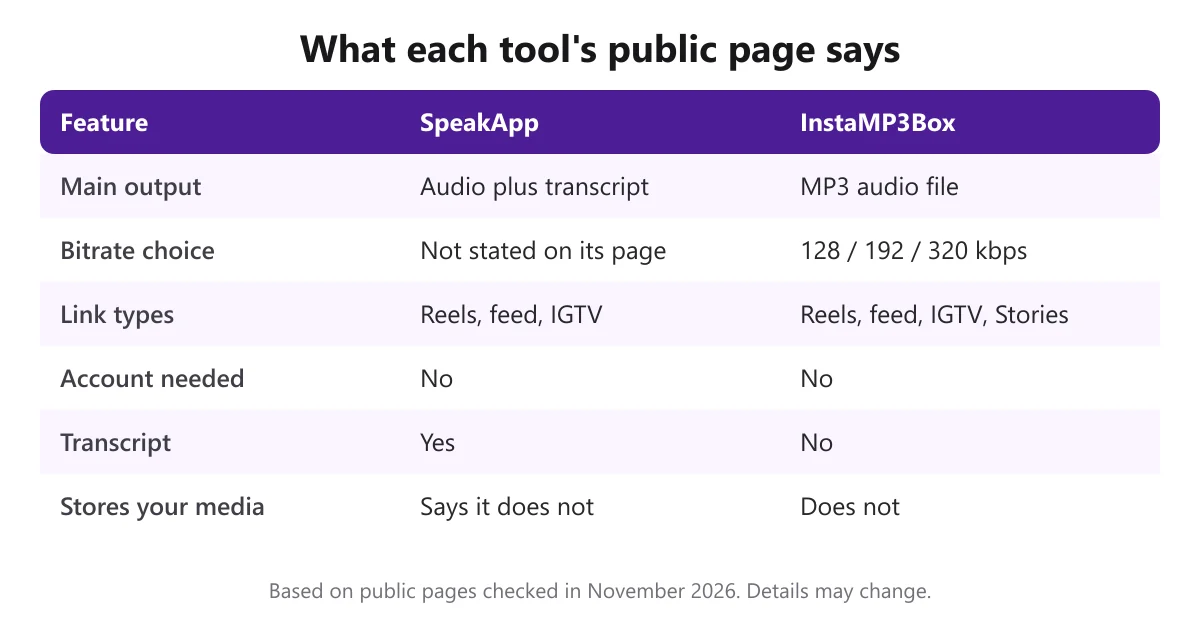
The difference comes down to purpose. SpeakApp’s tool is built around getting the words out of a video. InstaMP3Box is built around giving you a clean audio file. If you want both, you can combine them, as described below.
How to download Instagram audio, step by step
The process is almost identical in any link-based tool. Here it is with InstaMP3Box, which returns an MP3.
- Copy the link. In the Instagram app, tap the three dots on the post and choose Copy link. On a computer, copy the address from the browser bar.
- Paste it into the converter. Open the Instagram audio downloader, paste the link and choose 128, 192 or 320 kbps.
- Download the MP3. Check the title, creator and duration, then download. The file is encoded as it streams and is not stored on our server.
Specific guides cover each content type: the Reels to MP3 converter, the Instagram video to MP3 converter and the Story audio downloader. For more background on how the process works, see our complete guide to the Instagram audio downloader.
When a transcript is what you really need
A transcript is valuable when the audio is speech and you want to search it, quote it or reuse the ideas. Speech recognition, the technology behind it, is explained in this overview of speech recognition. A few cases where it helps:
- Research and note-taking. Pull the key points from a long talk or interview posted as a Reel or video.
- Accessibility and captions. Text makes content easier to follow for people who cannot or prefer not to listen.
- Repurposing your own content. Turn a spoken Reel into a blog post, newsletter or caption.
- Translation. Text is easier to translate than a recording.
Transcripts are only as good as the audio and the language model behind them. Names, accents, background music and fast speech all cause mistakes, so always read the result before you publish it.
When a plain MP3 is the better choice
- You need a file you can edit. A known format and bitrate is easier to work with in an audio editor. See our guide to the Instagram audio editor.
- The audio is music or ambient sound. A transcript adds nothing, and format and quality matter more.
- You want to control quality and size. 128 kbps is about 1 MB per minute, 192 kbps is about 1.4 MB and 320 kbps is about 2.4 MB.
- The link is a Story. If the tool does not mention Stories, test it before you rely on it. Our Story audio downloader covers them while they are live.
- You want a clean file with nothing added. See our article on an Instagram audio downloader without watermark.
Using both: audio first, then text
You do not have to choose one tool for ever. A simple workflow gives you the best of both:
- Download the audio as an MP3 from a public post you have rights to.
- Keep it as your master file, in the bitrate you want.
- Run it through a transcription app, including a voice-notes app like SpeakApp, to get the text.
- Edit the transcript, and use the audio separately if you need it.
Because the file stays on your device, you can transcribe it as many times as you like, with different tools, without going back to Instagram.
Who should use which tool
The right choice depends on what you plan to do next, not on which tool sounds more impressive.
- A journalist, student or researcher who needs quotes from spoken content will usually prefer a tool that returns text, then check the transcript against the audio.
- A podcaster or video editor who wants to reuse their own spoken Reel needs a reliable audio file first, because the editing happens on the audio, not the text.
- A musician or content creator archiving their own sounds should pick a tool with a stated format and bitrate, so every file in the library is consistent.
- Someone saving a Story before it expires needs a tool that explicitly supports Stories, since they disappear after 24 hours.
- A casual listener who just wants a clip on their phone can use either tool; the quickest one is the one that works on their link.
If you are unsure, run the same public clip through two tools and compare the results. Listen to the audio, read the transcript if there is one, and look at the file size and format. Five minutes of testing on a clip you own is more informative than any comparison article, including this one.
How to choose a tool you can trust
Whichever you pick, run through a short checklist:
- No Instagram login. A tool for public posts should never ask for your password.
- Clear output. You should know what format and quality you are getting.
- Plain privacy statements. Look for what is stored and for how long; ours is in the privacy policy.
- No installs from unknown sources. Use official app stores for mobile apps.
- A real way to contact the team. Our contact page lists support and copyright addresses.
Rights and what you can do with the audio
A downloader gives you a file, not permission. Audio from your own posts is yours. Content you have written permission for, or that is openly licensed, is fine when you follow its terms. Someone else’s voice or music is not yours to republish, and a transcript of copyrighted spoken content does not change that. For sources you can legally reuse, read our guide to a safe and legal audio download as a free MP3. Our terms of service explain how the converter may be used. This is general information, not legal advice.
Troubleshooting
- The tool says the post is unavailable. The account may be private, the post deleted or the Story expired. Test the link in a private browsing window.
- You are not sure what file you received. Check the extension and the file properties in your media player.
- The transcript is wrong. Re-run it on a cleaner audio file, or correct it by hand. Music behind speech is a common cause.
- The link will not convert. Open the exact Reel or post and copy its link again. Profile and highlight links do not work.
- You want to know which song is playing. That is a different problem; see our Instagram Reels audio finder guide.
The short version
SpeakApp’s Instagram audio download is a free web tool for public Reels and videos that returns audio plus a transcript, which makes it a good fit when you want the words. When you want a standard MP3 with a bitrate you control, or you need Stories, a converter such as InstaMP3Box is a better match. Check the details on each tool’s own page, test on something you own, and keep to audio you have the right to use.
InstaMP3Box Team
The InstaMP3Box team writes guides on saving audio from Instagram — from quick how-tos to deeper explainers on bitrate and file formats.
How we write and update our guidesFollow on X (Twitter) ↗Frequently asked
What is SpeakApp's Instagram audio download?
It is a free web tool on SpeakApp's site that, according to its page, extracts the audio from a public Instagram Reel or video and also produces a text transcript. It needs no account and no install.
Does SpeakApp download Instagram audio as MP3?
Its page does not state the audio format or bitrate, so we cannot say. If you need a specific MP3 quality, test it on a clip you own, or use a converter that lets you choose 128, 192 or 320 kbps.
Can I download audio from a private Instagram account?
No. Both SpeakApp's tool and InstaMP3Box work with public content only. Private accounts, deleted posts and expired Stories cannot be read.
What is the difference between SpeakApp and InstaMP3Box?
SpeakApp's tool returns audio plus a transcript. InstaMP3Box returns an MP3 at a bitrate you choose and supports live Stories, but does not make transcripts. You can download an MP3 first and transcribe it with any app.
Is it free to download Instagram audio?
Yes for both. InstaMP3Box needs no account, card or trial. SpeakApp's page describes its web tool as free with no account. Check each site for current limits.
Is it legal to download and transcribe Instagram audio?
Saving and transcribing your own audio, or content you have permission to use, is generally fine. Reusing someone else's audio without a licence can infringe copyright, with or without a transcript. This is general information, not legal advice.