

Audio Download Free MP3: Safe and Legal Ways
Audio download free MP3 without the risk: legal sources for free music and sound effects, how licenses work, and how to save your own audio as an MP3.
InstaMP3Box Team9 min read
On this page▼
- Key takeaways
- What “free MP3 download” really means
- Where to find free MP3 audio legally
- Free Music Archive
- Internet Archive audio collections
- Freesound for sound effects
- Royalty-free music libraries
- Public-domain classical recordings
- Artists who give music away
- Understand the license before you download
- Download your own audio as MP3
- Choose the right MP3 quality
- Free MP3 audio for common projects
- How to spot an unsafe “free MP3” site
- Keep a simple attribution record
- Prepare and organise your free MP3 files
- Troubleshooting free MP3 downloads
- The short version
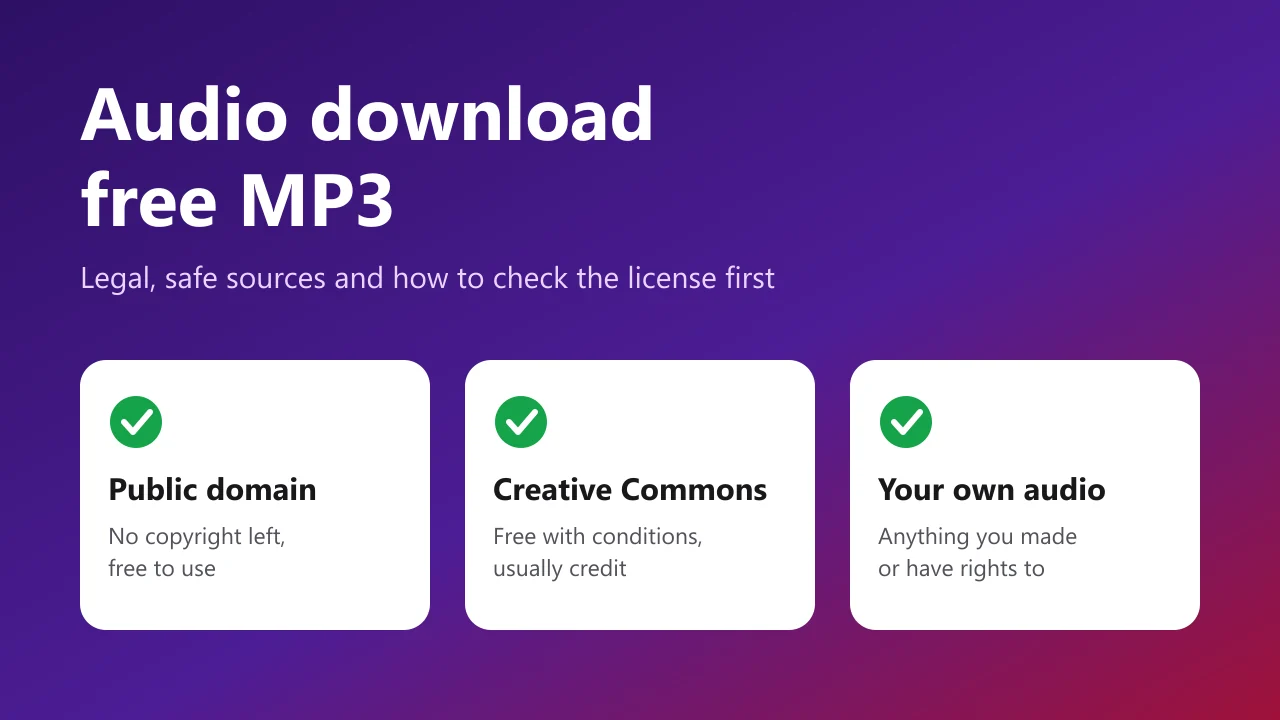
The safest way to do an audio download free MP3 is to use sources that have the right to give the file away: public-domain recordings, Creative Commons libraries, royalty-free music sites, and audio you made yourself. “Free to download” and “free to use” are not the same thing, and the gap between them is where most people get into trouble, from takedown notices to malware.
This guide shows where to find free MP3 audio legally, how to read the license before you download, how to avoid the unsafe sites that dominate the search results, and how to convert audio you already have rights to, such as your own Instagram videos, into a clean MP3. Everything here is general information, not legal advice.
Key takeaways
- Check the license, not just the price. A track can cost nothing and still forbid commercial use or editing.
- Use libraries built for sharing: Free Music Archive, Freesound, the Internet Archive, Musopen and royalty-free libraries.
- Avoid sites that host chart hits for free. They are almost never licensed, and they are a common route for malware.
- Keep a record of the source, license and credit line for every file you publish.
What “free MP3 download” really means
People search for an audio download free MP3 for very different jobs: background music for a video, a sound effect for a game, a podcast intro, a presentation, or something to listen to offline. In each case the legal question is the same: who owns this recording, and what did they allow?
Free can mean four different things:
- Public domain: no copyright applies, so anyone can use it.
- Openly licensed: the creator keeps the copyright but grants permission under stated terms, for example Creative Commons.
- Free with a platform license: a site lets you use its tracks under its own rules, often including limits such as no reselling the file on its own.
- Free but unlicensed: copyrighted music uploaded without permission. Downloading it is not made lawful just because the button says free.
The first three are fine when you follow their terms. The fourth is the one to avoid.
Where to find free MP3 audio legally
These sources exist to share audio. Terms change over time, so always read the license on the individual track page before you rely on it.
Free Music Archive
The Free Music Archive is a large catalogue of music that artists have released under open licenses. It lets you filter by license type, which is the quickest way to find tracks suitable for commercial projects.
Internet Archive audio collections
The Internet Archive’s audio section hosts concerts, spoken-word recordings, old-time radio and public-domain material. Rights vary by item, so check the license shown on each page.
Freesound for sound effects
Freesound is a community library of field recordings and effects such as doors, rain, footsteps and ambience. Items are published under Creative Commons licenses, and downloading requires a free account.
Royalty-free music libraries
Sites such as Pixabay Music offer tracks under their own content license. These are convenient and usually allow use in videos and podcasts, but read the terms, because most do not let you resell or redistribute the audio file by itself. YouTube also provides an audio library to creators inside YouTube Studio, with its own usage rules.
Public-domain classical recordings
Musopen focuses on classical recordings and sheet music released for public use. A useful warning applies here: a composition can be public domain while a particular recording of it is still protected, so rely on recordings explicitly released for free use.
Artists who give music away
Many independent artists offer free or pay-what-you-want downloads on their own sites and on platforms such as Bandcamp. Supporting them directly is often the best route to high-quality files with a clear licence.
Understand the license before you download
Most open audio uses a Creative Commons license. You do not need a law degree to read one; four ideas cover almost everything:
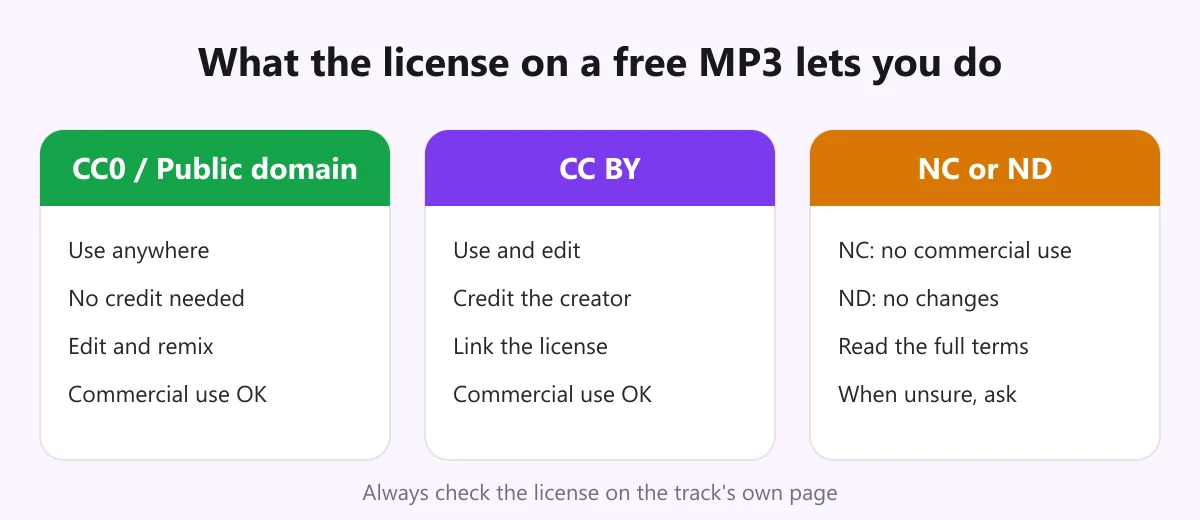
- CC0 / public domain: use it however you like, with no credit required. See the CC0 dedication.
- BY (attribution): you may use and edit it, including commercially, but you must credit the creator and link the license.
- NC (non-commercial): no use that is primarily for commercial gain. A monetised channel or a client project usually counts as commercial.
- ND (no derivatives): you cannot change the track, which can rule out trimming, remixing or layering.
Licenses can be combined, such as BY-NC-ND. The Creative Commons license overview explains each combination. When a license is unclear, treat the audio as off limits and ask the creator.
Download your own audio as MP3
The most reliable free audio is the audio you already own. That includes voice-overs, interviews and music you posted yourself, and sound you have written permission to reuse. If it lives on Instagram, you can turn it into an MP3 in a minute.
- Copy the link of the public Reel, video or Story: three dots, then Copy link.
- Paste it into the converter. Open the Instagram audio downloader, paste the link and choose 128, 192 or 320 kbps.
- Download the MP3. It is encoded as it streams to you and is not stored on our server.
There is no account, no app and no Instagram login. Specific guides cover each content type: the Reels to MP3 converter and the Instagram video to MP3 converter. For a deeper look at the tool itself, read our complete guide to the Instagram audio downloader, and for clean files with no overlays, see the article on an Instagram audio downloader without watermark.
One important boundary: converting someone else’s post does not give you the right to reuse it. Our terms of service spell out permitted use.
Choose the right MP3 quality
If a site offers several versions, the bitrate decides size and sound. Approximate sizes per minute are:
- 128 kbps is about 1 MB per minute. It is fine for speech, podcasts and voice notes.
- 192 kbps is about 1.4 MB per minute. It is a good all-round choice for music.
- 320 kbps is about 2.4 MB per minute. It suits audio you will keep editing, because each later edit adds loss.
Higher is not always better. MP3 is lossy, so converting a low-quality file to 320 kbps just makes a bigger copy of the same sound. Always pick the best source you can find, then encode once.
Free MP3 audio for common projects
- Video and Reels: pick tracks whose license allows commercial use if the channel is monetised or promotes a business. Check whether the platform also offers its own cleared music library.
- Podcasts: use a short, openly licensed intro and outro, and note the credit in your show notes. Keep the licence link with the episode.
- Presentations and school work: non-commercial licenses are usually fine for classroom use, but still credit the creator.
- Games and apps: prefer CC0 or royalty-free licenses that allow redistribution inside software.
- Sound effects: Freesound-style libraries are ideal; combine two or three short effects to make something distinctive.
How to spot an unsafe “free MP3” site
The search results for this keyword are crowded with sites that promise any song for free. A few warning signs save a lot of trouble:
- It lists current chart hits for free download. Rights holders do not give those away, so the site is almost certainly unlicensed.
- It asks you to install a player, extension or “downloader”. You never need software to download an MP3.
- The download file is not an MP3. An .exe, .msi, .apk or .zip with an installer is a red flag. A genuine file ends in .mp3.
- There are fake buttons and pop-ups. Several “Download” buttons, redirects and countdowns that restart are a pattern.
- There is no license information. A trustworthy source tells you who made the track and under what terms.
- The site asks for card details for a “free” file. Close the tab.
Stick to HTTPS sites, keep your browser and operating system updated, and never enter passwords on a download page. Our own privacy policy explains what the converter does and does not collect.
Keep a simple attribution record
For every track you publish, save the details at the moment you download it. Pages change and tracks disappear, and a record protects you if a question comes up later. A short template works well:
- Title and creator: the exact names shown on the page.
- Source URL: the page you downloaded from.
- License and version: for example, CC BY 4.0.
- Date downloaded: so you know which terms applied.
- Credit line: “Title by Creator, licensed under CC BY 4.0, source URL.”
Store this in a spreadsheet next to the audio files, and put the credit line in your video description or podcast show notes.
Prepare and organise your free MP3 files
A little housekeeping after you download makes the files easier to use and easier to defend later.
- Keep the original. Save the untouched download in one folder and do your edits on copies. If a license forbids changes (ND), the original is the only version you may use.
- Trim and fade rather than re-encode repeatedly. Cut silence at the start and end, add a short fade, and export once. Each extra export from an MP3 adds a little loss.
- Match loudness. Tracks from different sources can differ a lot in volume. Check them against each other before you publish, so listeners are not reaching for the volume control.
- Use sensible file names. A pattern such as
creator-title-license.mp3keeps the license visible every time you open the folder. - Fill in the tags. Most players let you edit the title, artist and comment fields. Putting the license and source in the comment field means the information travels with the file.
- Back up the record. Keep the attribution spreadsheet next to the audio, in a place that is saved automatically.
If you are working with sound effects, create a small personal library with folders for categories such as ambience, impacts and transitions. Re-using a handful of well-labelled, properly licensed files is faster and safer than searching from scratch for every project.
Troubleshooting free MP3 downloads
- The file will not play. Check that it really is an MP3 and not a renamed video or archive. Open it in a different player.
- The sound is thin or distorted. The source was low quality or heavily compressed. Look for another version rather than re-encoding it.
- The download will not start. Disable aggressive ad blockers for that one site, or try another browser.
- An Instagram link will not convert. The account may be private, the post deleted or the Story expired. Only public posts can be read.
- You need to contact someone about a license. Ask the creator directly, and keep the reply. For rights questions about our service, use the contact page.
The short version
Treat every audio download free MP3 request as two questions: where is the file from, and what does the license allow? Start with libraries built for sharing, read the terms on the track page, keep a record of your credits, and avoid sites that offer popular songs for nothing. For audio you already own or have permission to reuse, the InstaMP3Box converter turns a public Instagram link into a clean MP3 in a few seconds.
InstaMP3Box Team
The InstaMP3Box team writes guides on saving audio from Instagram — from quick how-tos to deeper explainers on bitrate and file formats.
How we write and update our guidesFollow on X (Twitter) ↗Frequently asked
Is it legal to download free MP3 audio?
Yes, when the audio is public domain, openly licensed such as Creative Commons, or offered free by the rights holder, and you follow its terms. Downloading copyrighted music from sites that host it without permission is not made legal by the word free.
Where can I download free MP3 music legally?
Good starting points are the Free Music Archive, the Internet Archive, Musopen for public-domain classical recordings, Freesound for sound effects, and royalty-free libraries such as Pixabay Music. Always read the license on each track.
Can I use free MP3 downloads in monetised videos?
Only if the license allows commercial use. CC0 and CC BY generally do, with credit for CC BY. NC (non-commercial) licenses do not cover monetised content. Check the track page every time.
What does royalty-free mean?
Royalty-free means you do not pay per use or per play, but it is not the same as free of conditions. Many royalty-free libraries still limit redistribution, resale or certain commercial uses.
Which MP3 bitrate should I download?
Use 128 kbps for speech, 192 kbps for most music and 320 kbps if you plan to edit the audio. A higher bitrate cannot restore detail missing from the source.
How do I turn my own Instagram audio into an MP3?
Copy the link of your public Reel, video or Story, paste it into the InstaMP3Box converter, choose a bitrate and download. No account or app is needed, and the file is not stored on our server.