

Instagram Reels Audio Finder: Identify Any Sound
Instagram Reels audio finder guide: 6 ways to identify the song or sound in any Reel, save it for later, and what to do when the audio label is missing.
InstaMP3Box Team9 min read
On this page▼
- Key takeaways
- How audio works in Instagram Reels
- Six ways to find the audio in a Reel
- 1. Tap the audio label
- 2. Read the caption and comments
- 3. Open the audio page
- 4. Use a music-recognition app
- 5. Save the audio as an MP3
- 6. Ask the creator
- How to save a Reel’s audio in Instagram
- Identify a song when the audio label is missing
- Is the audio safe to reuse?
- Instagram Reels audio finder vs audio downloader
- Common problems and fixes
- The short version
The fastest Instagram Reels audio finder is already inside the app: tap the audio label at the bottom of the Reel to see the song name, the artist, or the creator of the original sound. When that label is missing, vague or wrong, you can read the caption and comments, search the audio page, run a music-recognition app, or save the Reel’s sound as an MP3 so it is easier to identify and keep.
This guide covers six reliable ways to find the audio in any Reel, explains the difference between licensed music and “Original audio”, shows how to save a sound for later, and lists what to try when nothing seems to work. Menus in Instagram change from time to time, so the exact wording on your screen may differ slightly from what is described here.
Key takeaways
- Start with the audio label. It sits at the bottom-left of the Reel and usually names the track or the creator.
- “Original audio” is not a song title. It means the sound was recorded or uploaded by that account, so you will not find it in a music catalogue.
- Recognition apps work on music, not on voices. They match recordings, so a voice-over or heavily edited clip often returns nothing.
- A clean MP3 helps. Saving a Reel’s audio gives you a file you can replay in a quiet room and identify properly, as long as you have the right to use it.
How audio works in Instagram Reels
Every Reel has a sound attached to it, and it comes from one of three places. Knowing which one you are dealing with tells you where to look.
- Licensed music. A song or track from Instagram’s music library. The label shows a title and an artist, and the audio page lists the song details.
- Original audio. The creator recorded the sound themselves, such as speech, ambient noise or music they made. The label says Original audio followed by the account name.
- Re-used sound. Someone took another Reel’s audio and used it in their own video. The label points back to the first creator, which is useful because you can trace a sound to its source.
Some audio can be unavailable. A track might be removed, restricted in your region, or disabled because the original creator deleted their post. In those cases the label may be greyed out or missing, and you will need one of the fallback methods below.
Six ways to find the audio in a Reel
1. Tap the audio label
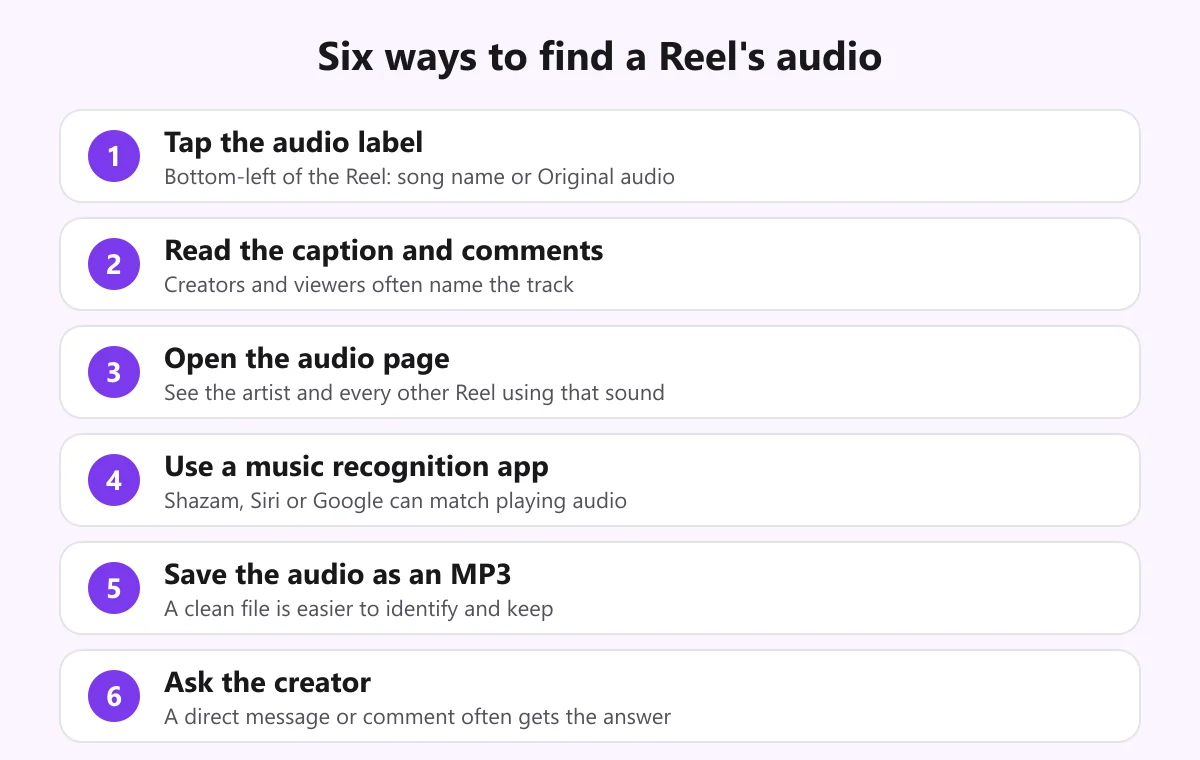
Open the Reel and look at the bottom-left, just above the caption. You will see a small music note followed by the song and artist, or the words Original audio and an account name. Tap it. Instagram opens the audio page for that sound, which is the closest thing the app has to an audio finder.
2. Read the caption and comments
Many creators name the track in the caption, and viewers regularly ask “what song is this?” in the comments. Scan the top comments and use the comment search or filter if it is available. Replies from the creator are especially reliable, because they come from the person who chose the sound.
3. Open the audio page
The audio page shows how many Reels use the sound, a preview player and, for licensed music, the track details. From here you can play other Reels that use the same audio, which often reveals a clearer version or a creator who names the song. You can also save the audio to your account so you can find it later when you make your own Reel.
4. Use a music-recognition app
If the label is useless, let your phone listen. Apps such as Shazam, the song-recognition feature built into many phones, and the search-by-sound option in Google’s apps compare a short clip with a database of recordings. They work by matching an acoustic fingerprint of the audio, a technique explained in this overview of acoustic fingerprinting.
For the best result, turn the volume up, move to a quiet room, and hold the phone close to the speaker for ten to fifteen seconds. If the Reel has someone talking over the music, wait for a section where the music is clear.
5. Save the audio as an MP3
Sometimes the problem is the Reel itself: it loops, it autoplays something else, or there is too much background noise. Saving the audio gives you a stable file you can play on repeat, slow down, or play into a recognition app on a second device. It also keeps the sound after the post is deleted or the audio is removed from the library.
Copy the Reel link, paste it into the Instagram Reels to MP3 converter, choose 128, 192 or 320 kbps and download. The audio is encoded as it streams to you and is not stored on our server. Only use this on content you made or have permission to reuse; see the legal notes below. For a device-by-device walkthrough, read how to download Instagram Reel audio on iPhone, Android and PC.
6. Ask the creator
If everything else fails, ask. A comment or direct message such as “Could you tell me the name of the song in this Reel?” is often answered, especially by smaller creators. Be specific about which part of the Reel you mean, and use a timestamp if the sound changes.
How to save a Reel’s audio in Instagram
If you only want to reuse the sound inside Instagram, you do not need a download at all.
- Open the Reel and tap the audio label to reach the audio page.
- Choose the option to save the audio. It is added to your saved audio list.
- When you create a Reel, open the music or audio picker and look for your saved sounds.
- Or choose the option on the audio page to use the sound, which opens the Reel camera with the audio already attached.
This keeps the audio inside Instagram’s licensing arrangements. It will not give you a file you can use outside the app, which is where a converter comes in, within the limits described below.
Identify a song when the audio label is missing
A missing or generic label is the most common reason people search for an Instagram Reels audio finder. These steps work through the likely causes:
- Check whether it is original audio. If the label says Original audio, the creator made the sound. Look at the account’s other Reels; a signature sound often appears repeatedly.
- Look for the first user of the sound. On the audio page, scroll to the oldest Reels using it. The earliest one often has the proper credit.
- Search lyrics. If you can make out any words, search for them with the word lyrics. Search engines are good at matching short lyric fragments.
- Hum or sing it. Many search tools can match a hummed melody when the original recording is not clear.
- Check hashtags and on-screen text. Trends often carry a track name in the hashtag, and creators sometimes show the song title in a text overlay.
- Try a different copy. Open the same Reel on another device or in a browser. Sometimes the label fails to load in one place.
Is the audio safe to reuse?
Finding a sound and being allowed to use it are two separate things. Instagram licenses music for use inside the app, and those licenses do not follow the file outside it. Business and brand accounts may also have a smaller music library than personal accounts, because licensing for commercial use is stricter, so a sound you can use on a personal account might not appear on a business account.
Outside Instagram, the rules are the ordinary ones for copyright. Your own audio is yours. Content you have written permission to reuse is fine. A commercial song in a monetised video is not, whether or not you found it through a Reels audio finder. If you need free audio you can use freely, read our guide to a safe and legal audio download as a free MP3, and our terms of service explain how the converter may be used. This is general information, not legal advice.
Instagram Reels audio finder vs audio downloader
People often mix up the two jobs, but they solve different problems.
- An audio finder answers “what is this sound?” It gives you a title, an artist or a source account.
- An audio downloader answers “can I keep it?” It gives you a file. Read our overview of the Instagram audio downloader to see how conversion works.
They work well together. Identify the sound first, then decide whether you need a copy. If the track is licensed music, the right move is usually to buy or stream it from an official source. If it is your own audio or a sound you have permission to reuse, a converter gives you a clean file. For a result with no overlays or branding, see our guide to an Instagram audio downloader without watermark.
Common problems and fixes
- The label shows Original audio but the sound is a famous song. The creator may have uploaded the music as their own sound. Use a recognition app on the audio to find the real track.
- A recognition app returns nothing. The clip may be a voice, a sped-up edit or a remix. Try a different section, or search lyrics or a hummed melody instead.
- The audio page says the sound is unavailable. It was removed or restricted. Check other Reels that used it, or ask the creator.
- A Reel will not convert to MP3. The account is private, the post was deleted or the link points to a profile. Only public posts can be read, and you can test a link by opening it in a private browsing window.
- The converted file has no music. Some Reels carry only speech or are silent, and the converter reports a missing audio track instead of making an empty file.
The short version
To find the audio in an Instagram Reel, tap the label, check the caption and comments, open the audio page, and run a recognition app if you still do not have an answer. Save the sound as an MP3 when you need a stable copy, and keep the reuse limits in mind. When you are ready to convert a public Reel you have the right to use, paste its link into the InstaMP3Box converter.
InstaMP3Box Team
The InstaMP3Box team writes guides on saving audio from Instagram — from quick how-tos to deeper explainers on bitrate and file formats.
How we write and update our guidesFollow on X (Twitter) ↗Frequently asked
How do I find the audio used in an Instagram Reel?
Tap the audio label at the bottom-left of the Reel. It shows the song and artist, or Original audio with the creator's account name, and opens the audio page for that sound.
What does Original audio mean on Instagram?
It means the sound was recorded or uploaded by that account, such as speech, ambient noise or music they made. It is not a song title, so you will not find it in a music catalogue.
Can Shazam identify music in Instagram Reels?
Often, yes, when the Reel plays clear music. Recognition apps match recordings, so a voice-over, a heavily edited clip or very quiet music may return no result.
How do I save a Reel's audio to use later?
Open the audio page by tapping the audio label and choose the save option. To keep an audio file outside Instagram, you can convert a public Reel you have permission to reuse into an MP3 with InstaMP3Box.
Why is the audio unavailable on a Reel?
The track may have been removed, restricted in your region, or disabled because the original creator deleted their post. Try the caption, comments or another Reel that uses the same sound.
Is it legal to reuse audio I find in a Reel?
Only if you own it or have permission. Finding a sound does not give you rights to it, and Instagram's music licenses apply inside the app. This is general information, not legal advice.